
Activity and Credits
Activity
Section titled “Activity”Activity, at the top right of the AI Receptionist tab next to Settings, lists every conversation the receptionist has handled - texts, emails, and calls - newest first. Once the receptionist is answering, it is what the tab opens on. Cards across the top summarize the range you are looking at:
- Conversations - how many the receptionist handled
- Appointments booked - how many new appointments it made. An appointment it moved is not counted here; the row shows a Rescheduled pill instead
- Needs follow-up - how many reached a person: a message it took, a caller it transferred, or a voicemail somebody left
- Message credits and AI credits - what those conversations used
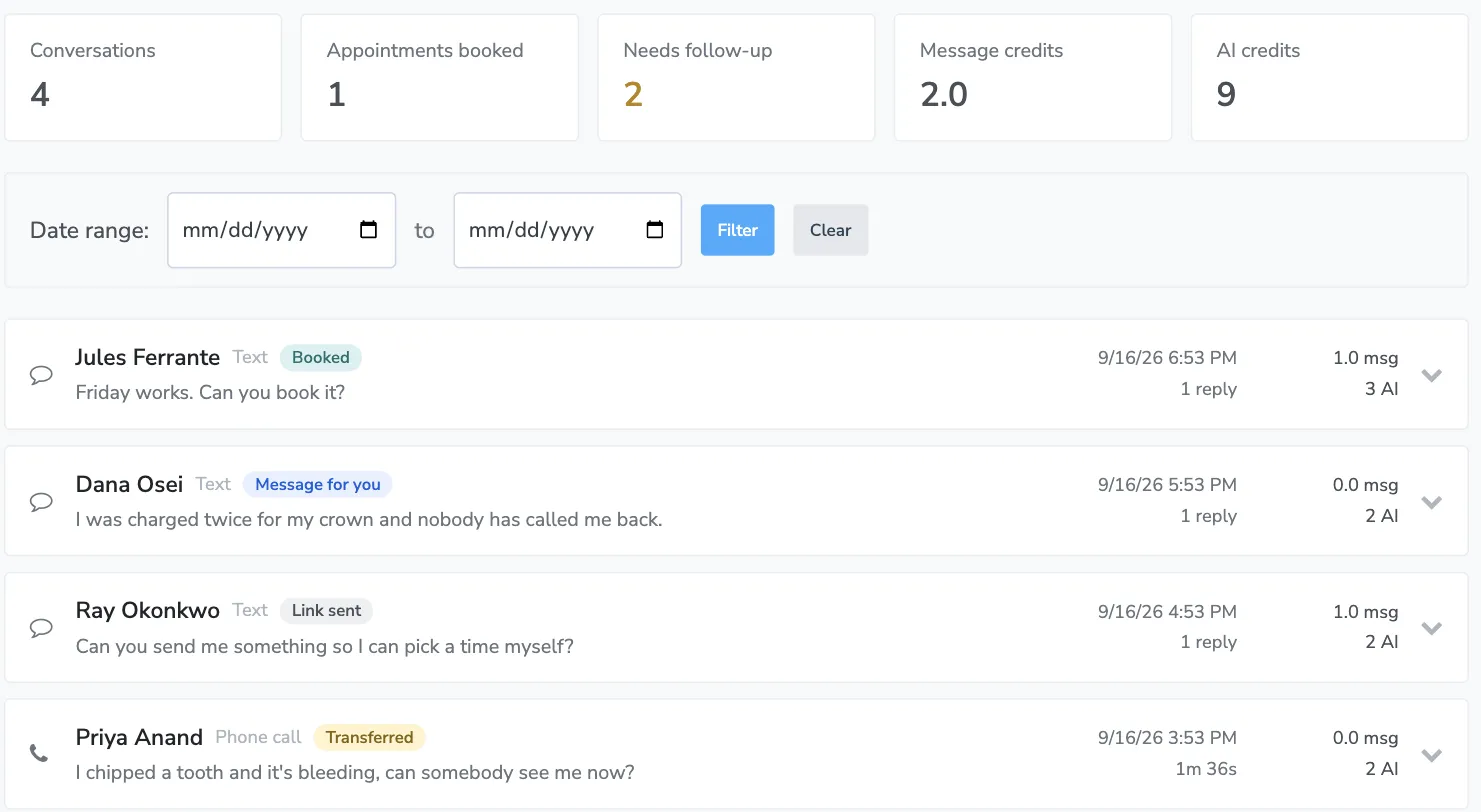
Use the date range boxes to narrow the list, and Clear to go back to the default. If the range is very wide you will see a note that only the most recent activity is shown; narrow the dates to reach older conversations.
With more than one receptionist
Section titled “With more than one receptionist”If your account runs a receptionist for each location, Activity lists all of them together. Each row carries the name of the receptionist that answered, and the bar at the top sums them up - for example, “2 of 3 receptionists answering — Airport is off.”
Choose a receptionist from the dropdown beside Date range to see only its conversations, or All receptionists to see everything again. From a receptionist’s own settings, Activity at the bottom of its list down the left jumps straight here, showing just that one.
Try it out, in the bar at the top, tests the receptionist the list is showing. With All receptionists chosen it tests the one you last opened, and the test panel names it.
Reading a row
Section titled “Reading a row”Each row shows the channel, who it was with, a preview of the last message, when it happened, how long the call lasted or how many replies were exchanged, and what it cost. Badges tell you the rest:
| Badge | Meaning |
|---|---|
| Test | A Try It Out conversation, not a real client |
| Assigned | Someone in the office handed this conversation to the AI Receptionist |
| Transferred | The caller was handed to a person. Calls only |
| Message for you | The receptionist took a message |
| Voicemail | The caller recorded a voicemail |
| Booked / Rescheduled | An appointment was made or moved. Click the pill to open it |
| Appointment confirmed / cancelled, Reschedule requested | It answered for the appointment the conversation was about. Click to open it |
| Link sent | A booking or reschedule link went out to the client |
| Error | Something went wrong during the conversation |
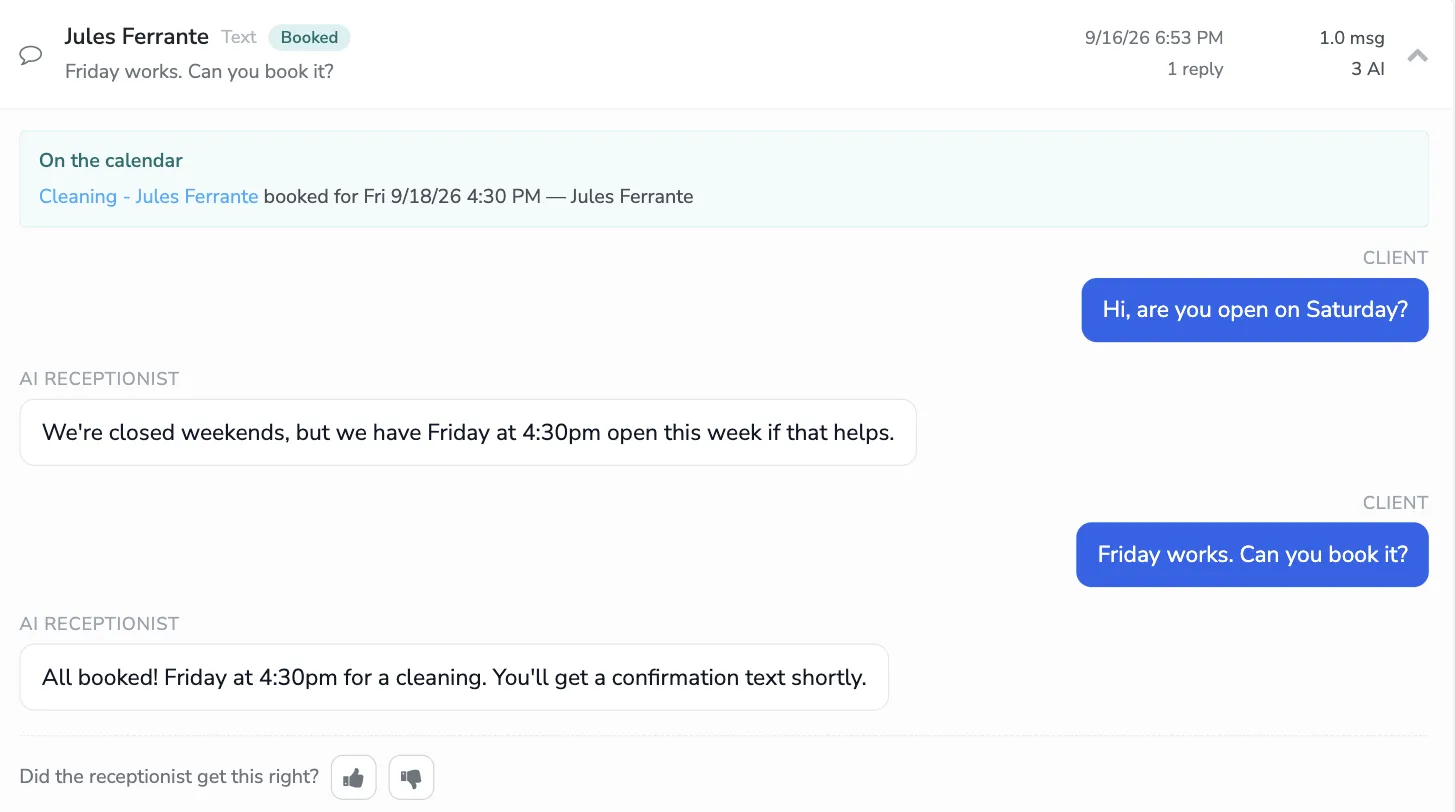
Click any row to open it. Above the transcript you get what the conversation left behind, so you can act on it without going anywhere else:
- The note the receptionist wrote for your office - a message it took, or a voicemail, with the recording playing right there. You no longer have to open your Inbox to hear one.
- Who it transferred the caller to a person for, with whatever it said about why.
- On the calendar - every appointment the conversation booked, moved, or answered for, each one a link into the appointment editor.
- The links the client was sent.
Then the full transcript of the conversation as it happened.
Telling it when it got something wrong
Section titled “Telling it when it got something wrong”At the bottom of an open conversation is Did the receptionist get this right? with a thumbs up and a thumbs down. Either one saves as soon as you click it, and a box appears for what it got right, or what it should have said or done instead.
On a thumbs down with a note, Suggest what to change appears. It reads that conversation against your own receptionist’s settings and tells you which box the fix belongs in. Where the answer is something it can write for you, Add this stages it on your Knowledge tab - go there and press Save to keep it. Where the fix is a setting, it names the tab and leaves it to you. And if nothing about your setup would have changed the outcome, it says so and passes the conversation to us.
What the receptionist costs
Section titled “What the receptionist costs”The receptionist uses two kinds of credit, and both are shown on every row.
Message credits
Section titled “Message credits”These are the same credits your reminders and auto messages use.
| What happened | Cost |
|---|---|
| A text the receptionist sends | One message credit per segment, like any text |
| An email the receptionist sends | Like any email |
| A minute the receptionist is on a call | 2 message credits per started minute |
| A minute after it transfers a caller to you | One credit per started two minutes, the usual call rate |
| A call your own phone answered, because it rang first | One credit per started two minutes, the usual call rate |
AI credits
Section titled “AI credits”AI credits pay for the thinking behind each reply, and they are shared across every AI agent on your account.
Testing with Try It Out does not use AI credits at all.
Seeing where the credits went
Section titled “Seeing where the credits went”The credits pill at the top right of the AI Receptionist tab shows what is left. Click it to open the account-wide usage breakdown, which shows your AI Credit Balance, free credits used in the last 30 days, a By Agent breakdown so you can see how much of it was the receptionist, and daily and monthly charts.
Click Back to the receptionist to return to the settings.
For plan limits and overage charges, see Billing.