
Set Up a Webhook Action
About Webhook Notifications
Section titled “About Webhook Notifications”An Apptoto Webhook Action is simply a HTTP POST request made from Apptoto’s servers to an URL endpoint of your choosing. A Webhook Action can transmit data from Apptoto across the web to another system or third party product and is a powerful tool that can be used for reporting purposes or integrating services with Apptoto.
Open Settings > Integrations and click the Webhooks header, then click Add Webhook:
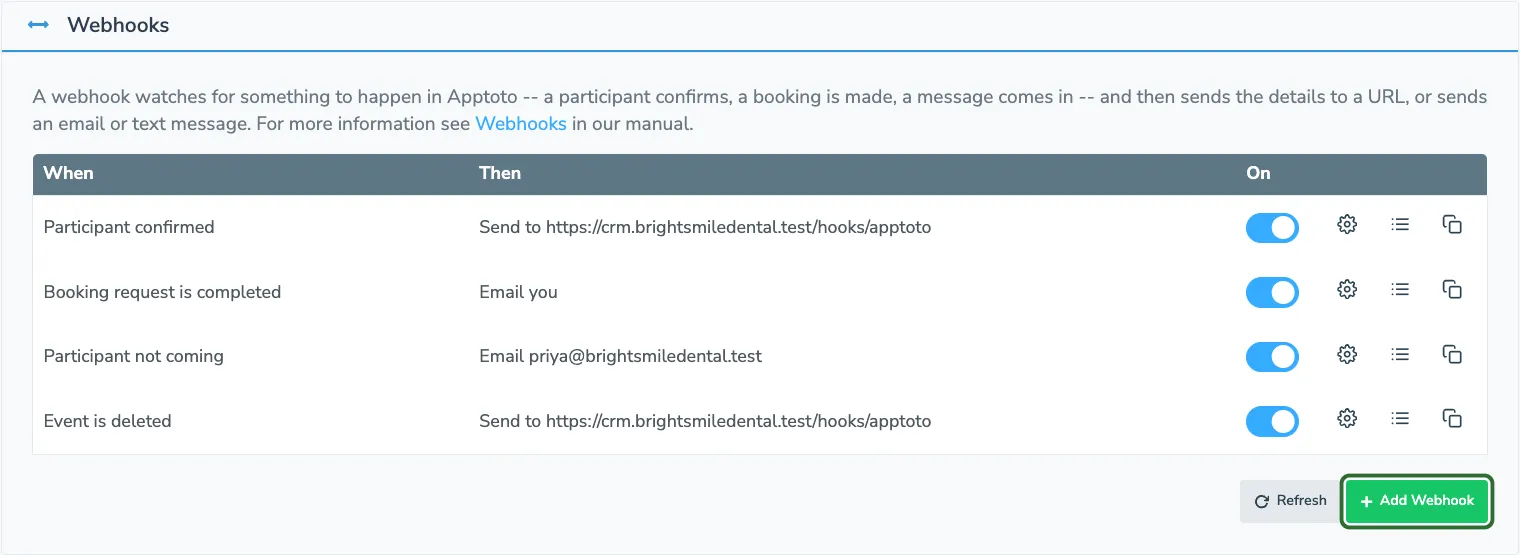
This opens the webhook form:
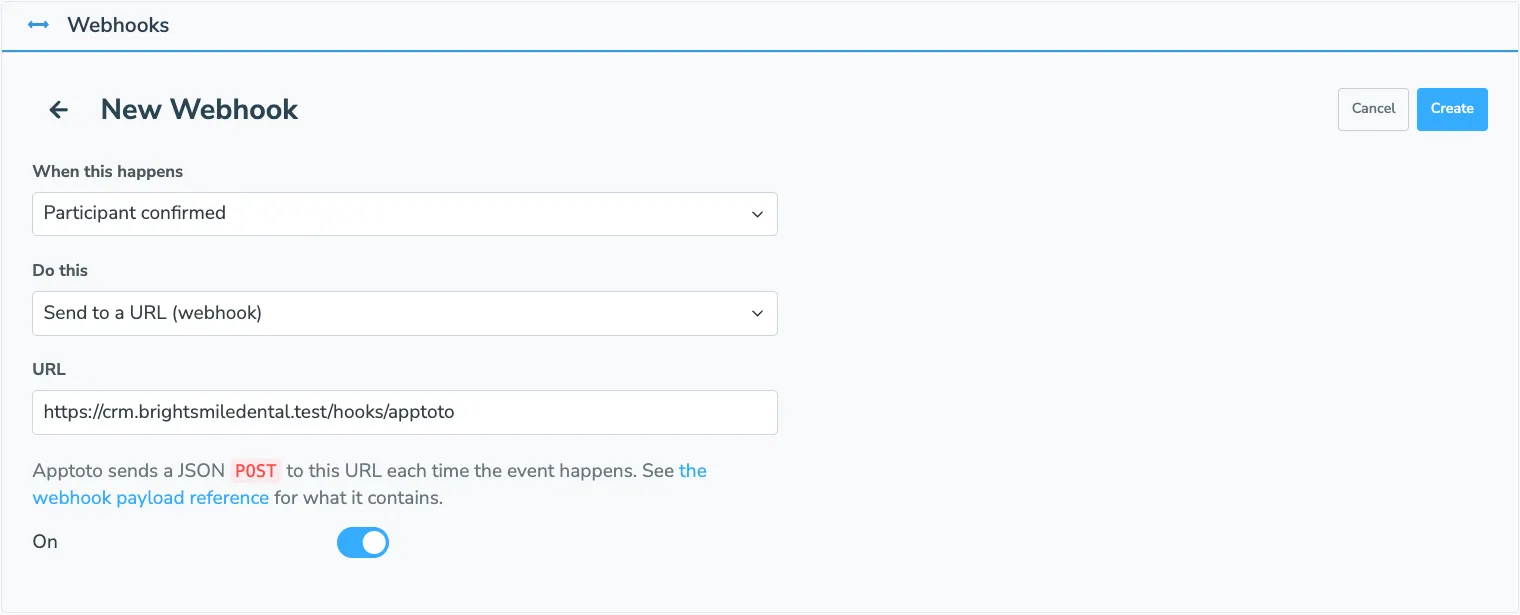
Choose the event under When this happens, then select Send to a URL (webhook) under Do this. A URL field appears; enter the web address (e.g. an API endpoint or a Zapier URL) that Apptoto should send the details to each time the event happens. Click Create. There is no name to fill in — the webhook list shows each webhook by its event and URL.
Webhook Action Payloads
Section titled “Webhook Action Payloads”When the event happens, Apptoto will make a HTTP POST request to the URL you entered. When this happens, the HTTP request is accompanied with information stored in a JSON format about the object the event is about, as well as an identifier that is unique to each delivery attempt.
The exact structure of this payload depends on the type of trigger that the Webhook Action corresponds to (e.g. a Webhook Action for an event-based trigger will contain information regarding an event, where a Webhook Action setup for a message-based trigger will send information relating to a message.) The exact structure of the payload for individual triggers are as follows:
Event-Based Triggers (“New event is created”, “Event is updated”, “Event is deleted”):
Section titled “Event-Based Triggers (“New event is created”, “Event is updated”, “Event is deleted”):”| JSON Attribute | Description |
|---|---|
| event | Event object (object) |
| id | Event ID (integer) |
| calendar_id | Calendar ID (integer) |
| calendar_name | Calendar name (string) |
| external_id | External Event ID (string) |
| start_time | Event start time (date) |
| end_time | Event end time (date) |
| all_day | All day (boolean) |
| title | Event title (string) |
| location | Event location (string) |
| content | Event content (string) |
| participants | (array of objects) |
| id | Participant ID (integer) |
| event_id | Event ID (integer) |
| display_name | Participant display name (string) |
| name | Participant name (string) |
| phone | Participant phone (string) |
| normalized_phone | Participant normalized phone number (string) |
| Email for participant (string) | |
| state | Reminder state or booking state (string) |
| custom_data | Custom data properties for event (object) |
| is_deleted | Indicates if event has been deleted (boolean) |
| apptoto_id | Unique identifier for webhook (string) |
Participant-Based Triggers (“Participant reminder state changed”, “Participant confirmed”, “Participant not coming”, et al.)
Section titled “Participant-Based Triggers (“Participant reminder state changed”, “Participant confirmed”, “Participant not coming”, et al.)”| JSON Attribute | Description |
|---|---|
| participant | Participant object (object) |
| id | Participant ID (integer) |
| event_id | Event ID (integer) |
| display_name | Participant display name (string) |
| name | Participant name (string) |
| phone | Participant phone (string) |
| normalized_phone | Participant normalized phone (string) |
| email (string) | |
| event | Event object (object) |
| id | Event ID (integer) |
| calendar_id | Calendar ID (integer) |
| calendar_name | Calendar name (string) |
| external_id | Event external ID (string) |
| start_time | Event start time (date) |
| end_time | Event end time (date) |
| all_day | Event is all day (boolean) |
| title | Event title (string) |
| location | Event location (string) |
| content | Event content (string) |
| custom_data | Custom field information (array of objects) |
| is_deleted | Event has been deleted (boolean) |
| apptoto_id | Unique identifier for webhook (string) |
Booking Page-Based Triggers (“Booking Page is viewed”)
Section titled “Booking Page-Based Triggers (“Booking Page is viewed”)”| JSON Attribute | Description |
|---|---|
| booking_page | Booking page object (object) |
| id | Booking page ID (integer) |
| name | Booking page name (string) |
| url | Booking page URL (string) |
| apptoto_id | Unique identifier for webhook (string) |
Booking Request-Based Triggers (“Booking request is completed”)
Section titled “Booking Request-Based Triggers (“Booking request is completed”)”| JSON Attribute | Description |
|---|---|
| booking_request | Booking request object (object) |
| token | Booking request token (string) |
| state | Booking request state (string) |
| appointment_type_token | Appointment type token (string) |
| occurrence_selected_event_id | Event ID of occurrence selected (integer) |
| start_time | Booking start time (date) |
| end_time | Booking end time (date) |
| sign_up_page | Booking page is sign up page (boolean) |
| timezone | Contact timezone (string) |
| field_data | Custom field data (object) |
| contact_info | Contact info object (object) |
| name | Contact name (string) |
| phone | Contact phone (string) |
| Contact email (string) | |
| booking_page | (object) |
| id | Booking page ID (integer) |
| name | Booking page name (string) |
| url | Booking page URL (string) |
| apptoto_id | Unique identifier for webhook (string) |
Message-Based Triggers (“Message sent”, “Message received”)
Section titled “Message-Based Triggers (“Message sent”, “Message received”)”| JSON Attribute | Description |
|---|---|
| message | Message object (object) |
| id | Message ID (integer) |
| participant | Participant object (object) |
| id | Participant ID (integer) |
| event_id | Event ID (integer) |
| display_name | Participant display name (string) |
| name | Participant name (string) |
| phone | Participant phone (string) |
| normalized_phone | Participant normalized phone (string) |
| Participant email (string) | |
| state | Participant reminder/ booking state (string) |
| started | Message started sending at (date) |
| comm_type | Communication type (string) |
| last_out | Last message out (date) |
| last_in | Last message in (date) |
| apptoto_id | Unique identifier for webhook (string) |
Phone number is added to stoplist
Section titled “Phone number is added to stoplist”| JSON Attribute | Description |
|---|---|
| phone | phone number (string) |
| apptoto_id | Unique identifier for webhook (string) |
Email is added to stoplist
Section titled “Email is added to stoplist”| JSON Attribute | Description |
|---|---|
| email (string) | |
| apptoto_id | Unique identifier for webhook (string) |
Logging
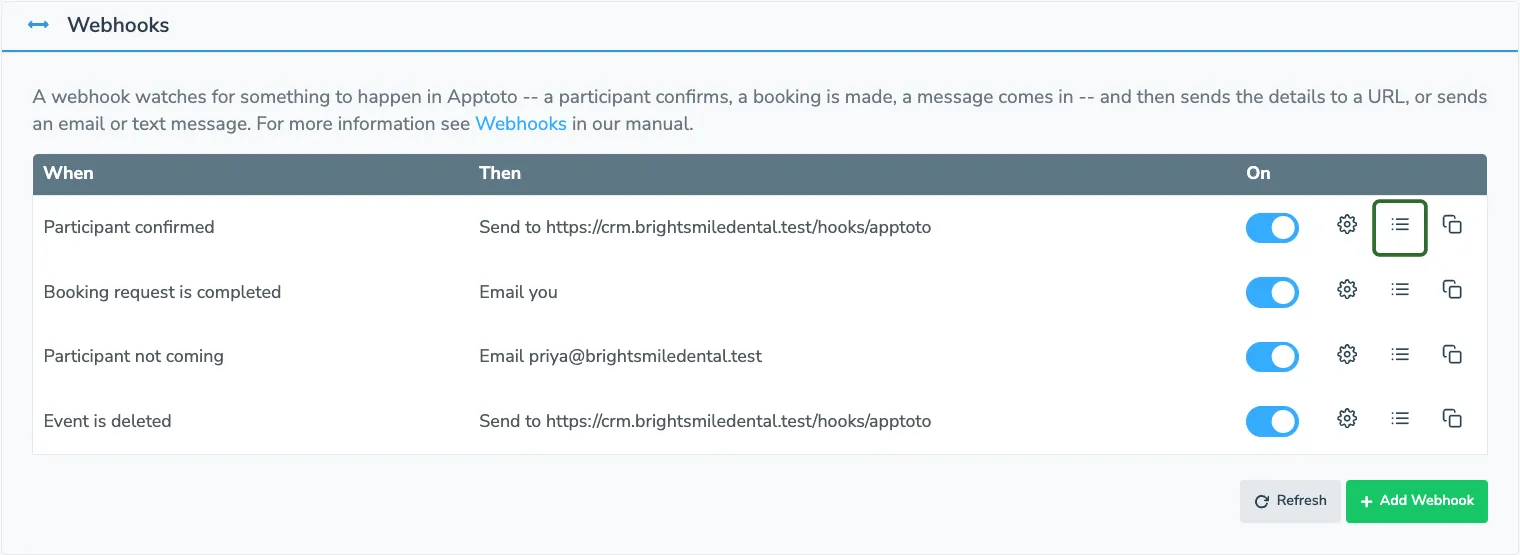
Section titled “Logging”For each webhook, you can view everything it has sent by clicking the log button next to it in the webhook list:
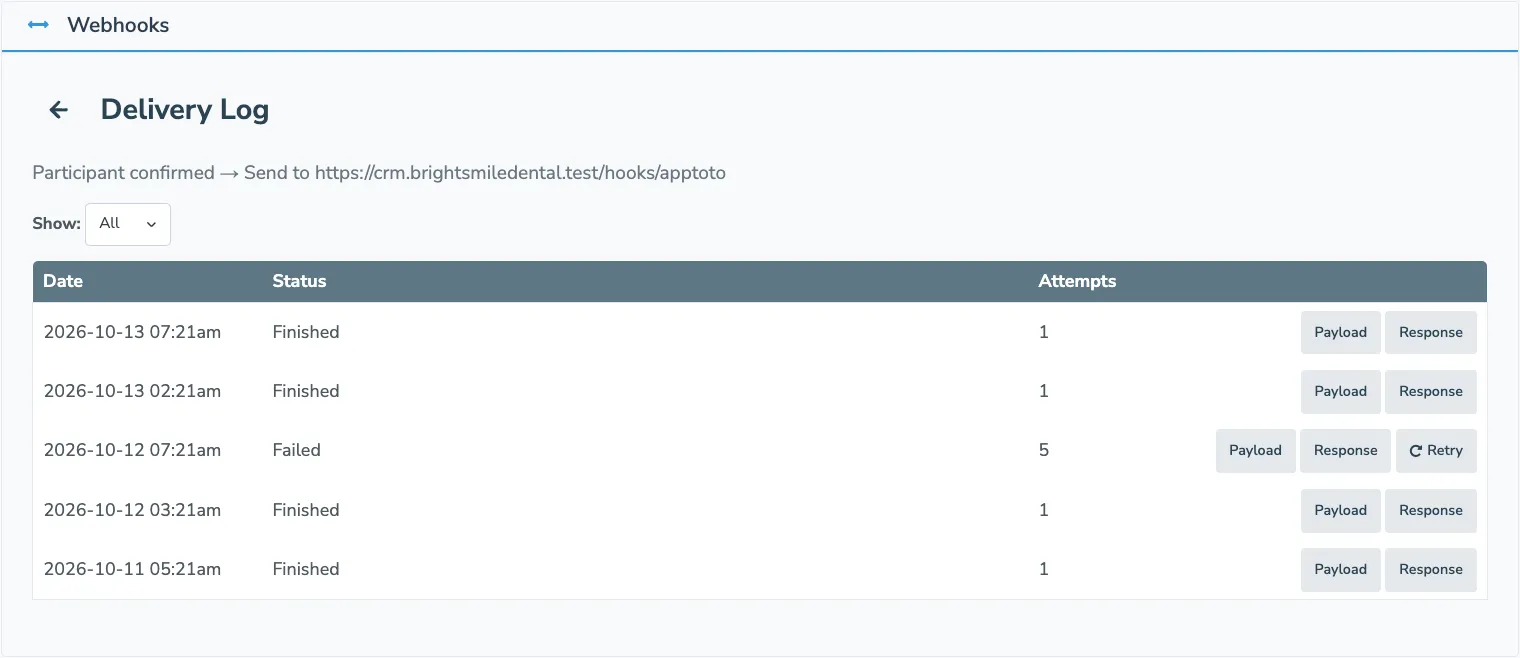
The delivery log lists each delivery newest first, with its status, the number of attempts, and buttons to view the payload Apptoto sent and the response your server returned. You can filter the log by status, and retry a failed delivery with the Retry button.
Webhook Action Attempts
Section titled “Webhook Action Attempts”Unlike email and text message webhooks, a webhook that sends to a URL will retry in certain circumstances.
In Apptoto, a Webhook Action is considered successful when a HTTP 200 response is returned from the server that Apptoto is doing a POST request against.
If the resource that Apptoto is posting against encounters a 500 series error (e.g. a 500 internal server error or a 502 bad gateway error), Apptoto assumes that the problem might be temporary and will retry the request again up to five attempts.
If a 400 series error is returned when the Webhook Action request is made (e.g. a 403 forbidden error or a 404 not found error), Apptoto will assume that a configuration error was made when setting up the webhook or that the webhook endpoint isn’t valid and thus the request instance should not be reattempted.
For developers, the webhook payload reference in the API documentation shows a full example payload for every event, and webhooks can also be created and managed through the Apptoto API.