You just wrapped up another successful job. Your client was thrilled. They even promised to leave a glowing review without you even asking. But days turn into weeks, and… nothing. Sound familiar? You’re not alone.
It’s not that they didn’t appreciate your work. But life gets busy, and even the best intentions get lost in the shuffle. Sometimes, they don’t know what to say or think, “I’ll do it later.” Enter SMS review requests: a powerful, direct, and convenient way to gather customer feedback. With high open rates and immediate reach, SMS review requests cut through the noise, making it easy for satisfied clients to share their experiences.
This guide provides industry-specific best practices and customizable templates for effective SMS review requests. Whether you’re a healthcare provider, home service professional, or salon owner, we’ve got you covered with strategies that work.
Why SMS Review Requests Work for Appointment-Based Businesses
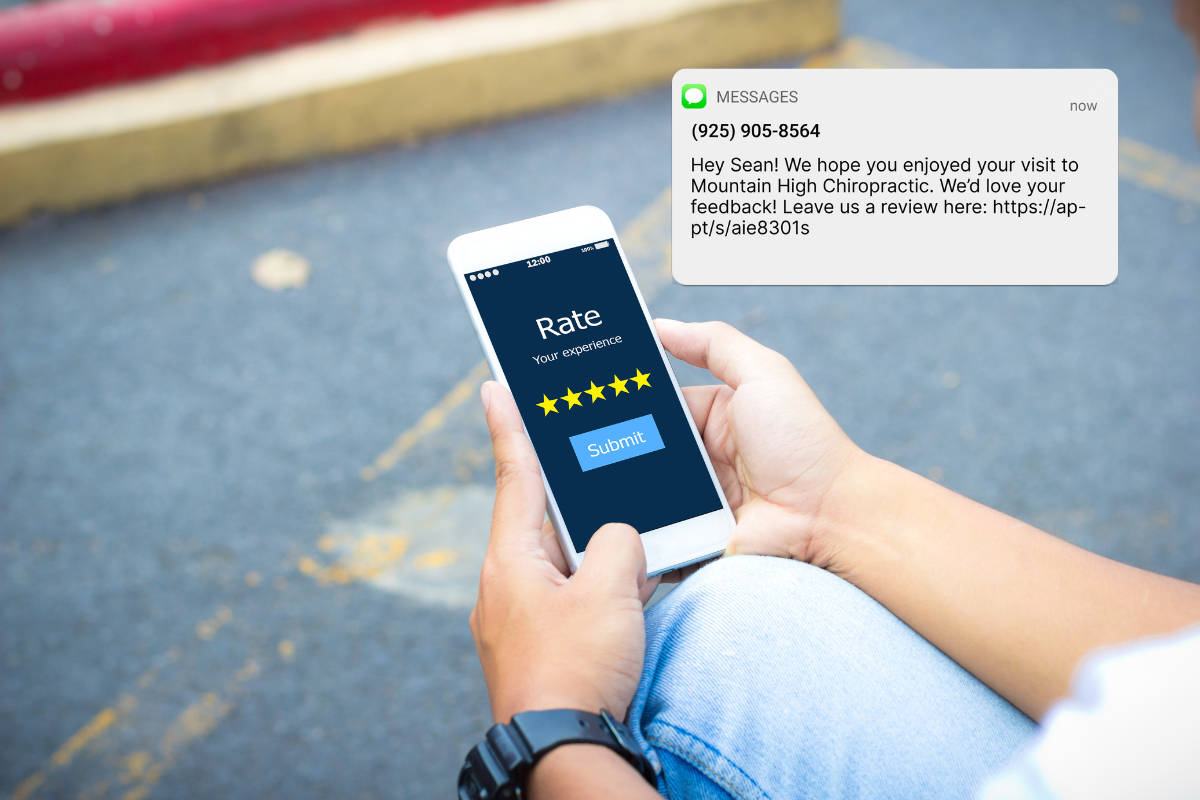
A review request text is a short SMS message sent to a client after an appointment or service, asking them to leave a review on Google, Facebook, or another platform. It typically includes a personalized greeting, a reference to the service provided, and a way to rate their experience and leave feedback.
The reason SMS works so well for this is speed: SMS review requests see a 34% completion rate compared to just 4.2% for email. By the time an email lands in someone’s inbox, a text has already been read, tapped, and acted on.
Immediate Reach and High Open Rates
Compared to email, SMS messages are read by over 90% of people within minutes of being received. This immediacy is crucial for capturing feedback while the service experience remains fresh in your customer’s mind.
Convenience for Customers
SMS review requests allow customers to leave reviews on the go without navigating complex review platforms. A simple tap on a link can direct them to Google, Facebook, or other industry-specific review sites.

Industry Relevance
Service-based businesses, especially those that rely on word-of-mouth and local visibility, benefit the most from SMS review requests. This includes:
- Healthcare Providers: Timely feedback on patient experiences.
- Home Services (e.g., Plumbers, Electricians): Immediate reviews post-service completion.
- Consulting and Professional Services: Feedback on client interactions and service delivery.
- Spas and Salons: Quick feedback on beauty treatments and customer service.
SMS review requests are particularly effective because the timing is natural. Businesses (like those above) already text their clients for booking confirmations and appointment reminders. Adding a review request to that sequence is a logical next step, not an interruption.
How to Ask for a Review Through Text: Best Practices
Follow these best practices to maximize engagement and avoid annoying your customers. These tips will help you craft messages that get opened and inspire customers to share their feedback.
Timing is Everything
- When to send: Right after the service is completed or within 24 hours when the experience is still fresh. For example:
- Immediately after a salon visit.
- Within a day after a home service is completed.
- A few hours after a medical consultation.
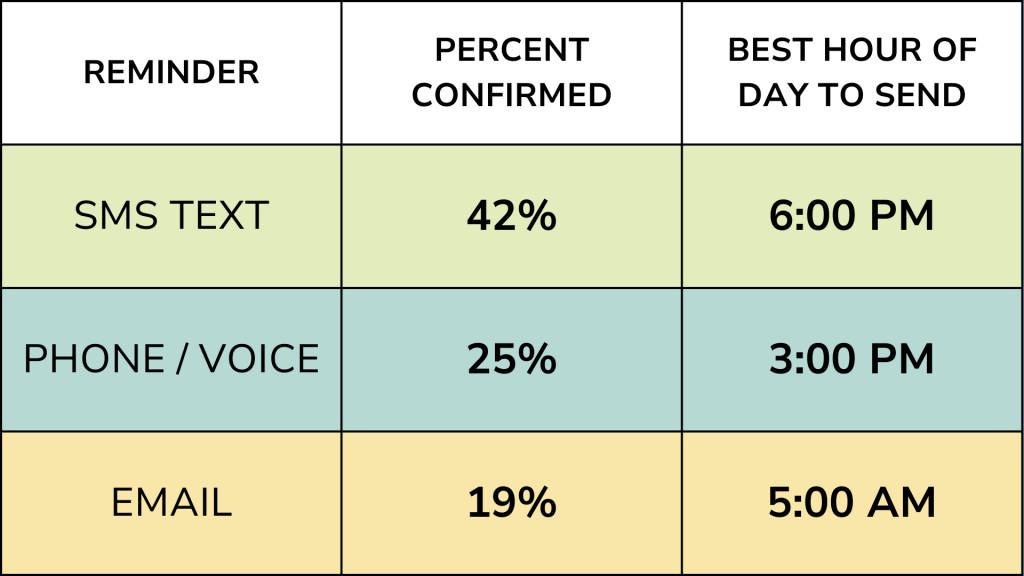
- Optimal days and times: Mid-mornings (10-11 AM) or early evenings (5-6 PM) tend to have the highest SMS engagement rates. Avoid sending messages late at night or during busy mornings.
Get Personal
- Use customer names: A personalized greeting makes the message feel more genuine. “Hi [Customer Name], we’d love to hear about your experience with [Service].”
- Reference the specific service: When possible, highlight the specific service or treatment they received: “How was your [service] appointment with [Technician Name]?”
Keep it Short and Sweet
- Ideal character length: 160 characters or less (but no more than 300)
- Call-to-action phrasing: Encourage quick feedback with phrases like:
- “Share your experience here: [Link]”
- “Help us improve! Leave a review: [Link]”
Use Clear and Simple Links
- Shortened URLs: Use URL shorteners for cleaner and more clickable links (Apptoto has this built in!)
- Link to review platforms: Ask your clients to leave feedback on platforms like Google, Yelp, or other industry-specific review sites, where potential customers often look before deciding to book a service
Get Consent, Stay Compliant
- Legal requirements: Ensure compliance with GDPR, TCPA, and other privacy regulations.
- How to obtain consent: Include a custom opt-in on your booking page (e.g., “Would you like to receive follow-up messages, including requests for feedback?”). Alternatively, you can send an initial consent message to notify customers they’ll receive texts from you and require them to opt-in (e.g., “Reply YES to opt-in”).
20+ Review Request Text Templates by Industry
Tailor your SMS review requests to resonate with your industry and audience. Below are some proven, customizable templates to get you started.
Healthcare & Medical Practices
Make patients feel valued and encourage feedback without compromising privacy or including protected health information (PHI) that could violate HIPAA.
“Hi, thanks for visiting [Practice Name]. We’d love your feedback! It only takes a minute, but helps us serve partients like you better: [Link].”
“Hello, we’d love to know how your visit at [Practice Name] went today! Do you have 5-minutes to let us know how we did by leaving us a review? Thank you! [Link].”
“Hello, we’d hope your appointment went smoothly! Would you consider sharing your experience today with our team? Your review helps other patient like you find great care. [Link].”
Only include the Practice name if it doesn’t indicate your patient’s diagnosis or ailment. For example, Alpine Medical Clinic is fine to use, but Alpine Cancer Treatment Center is most likely not.
Home Services (e.g., Plumbing, HVAC, Electrical, Cleaning)
Capture feedback on completed jobs and build trust in local communities.
“Hi [Name], how was your experience with [Technician Name]? Let us know here: [Link]. Thanks for choosing [Company Name]!”
“Hi [Name], just checking in! Is everything working well after yesterday’s [service]? If so, we’d appreciate a quick review: [Link]. Thank you for choosing [Company].”
“Hi [Name], thanks for trusting [Company] to get your [HVAC, Plumbing, yard, etc.] ready for the [season]. Mind sharing how it went? [Link] Your review helps us find other amazing customers like you!”
Legal and Professional Services
Enhance credibility and attract more clients through positive testimonials.
“Hi [Name], it was great working with you! If you have a moment, would you mind sharing your experience: [Link]. It helps others in similar situations find the right help!”
“Hi [Name], thank you for trusting [Firm] with your [case or service type]. We’d be greatful if you’d leave us a review to let us know how we did: [Link].”
Spas, Salons, Barbers, & Beauty Services
Encourage satisfied customers to leave reviews that can drive new clients.
“Hi [Name], how did you like your [Service]? Let others know about your experience: [Link]. Thanks for visiting [Salon].”
“Hi [Name], [Stylist] loved doing your [Service] today! A quick review would mean the world to our team and let us know how we can serve you even better next time. [Link]”
Accounting, Tax & Financial Services
“Hi [Name], now that your [year] taxes are filed, would you mind sharing your experience with [Firm]? Your review helps others like you determine if we’re a good fit for them. [Link]”
“Hi [Name], thanks for meeting with us to discuss your financial plan for the [time period] ahead. We’re always looking to improve how we serve our customers, so would you consider leaving us a review letting us know how we did? [Link]”
Universal Templates (Any Industry)
[Greeting] + [Personalization] + [Call-to-Action] + [Link] + [Thank You]
“Hi [Name], we hope you enjoyed your [service] on [date]. Mind sharing your feedback here: [Link]? Thanks for choosing [Company]!”
“Thank you for choosing [Company], [Name]! Your feedback helps us improve and helps others discover our business. [Link]”
“Hi [Name], we hope you enjoyed your visit today. Do you have 30 seconds to let us know how we did? [Link]. Your Google review helps us improve our business and lets other customers like you know more about us! ”
“Hi [Name], we hope you had a great experience today! If you have a minute, would you leave a review [Link] and let us know if there’s anyone we should be helping too.”
“Hi [Name], you’ve been a customer of [Company] for [time period] now, and we can’t tell you how much we appreciate your continued business. If you haven’t yet, we’ve love if you left us a review to let us know how we’re doing: [Link]”
How to Automate Review Request Texts with Apptoto
Sending review request texts manually is doable when you have five clients a week. When you have five a day (or fifty), you need automation. Apptoto’s Reputation Management tool was built for exactly this: it sends personalized review request texts after every appointment, forwards responses to your inbox, and aggregates your reviews into a single dashboard.
Because Apptoto connects directly to your existing calendar (Google, Outlook, Salesforce, and more), it can send a review request to any appointment, regardless of how that appointment was booked: online, over the phone, or manually entered. That is the key difference between Apptoto and scheduling-only tools that can only message clients who booked through their system.
Setting Up Automated Review Requests in Apptoto
You can set this up in minutes. For detailed instructions, see our step-by-step automated review requests setup guide. Here is the overview:
- Navigate to Reputation Management in your Apptoto account, and launch a new trial if you haven’t already.
- On the settings tab, sync your Google Business Profile, Facebook, or Yelp profile with Apptoto or any custom review sites you want.

- By default, Apptoto will send an appointment reminder to every appointment that wasn’t marked as a no-show or cancellation.
- Limit which appointments Apptoto sends review requests to by selecting the pencil icon next to ” Send Review Requests to
all appointments,” and setting custom parameters.
- Limit which appointments Apptoto sends review requests to by selecting the pencil icon next to ” Send Review Requests to
- Determine if you want email or SMS text review requests, and how long after appointments you want them delivered. You can also edit the message or email content by clicking the pencil icon next to the review type.
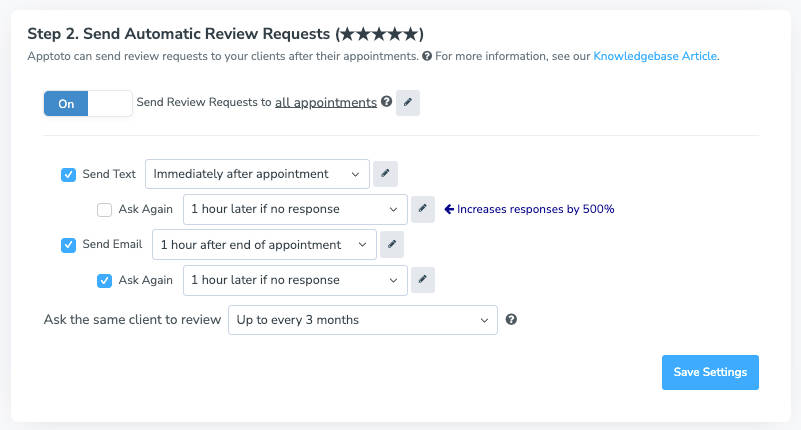
- Set your follow-up and nudge timing to remind clients to review if they don’t within a certain time frame
- Customize how many months Apptoto should wait to send them a new review request after the initial series.
- Turn it on. Apptoto handles the rest for every appointment that matches your messaging rules.
Common Mistakes that Hurt Your Repsonse Rate
Sending SMS review requests seems simple enough until you realize your messages are being ignored or annoying your customers. Ouch. But don’t worry. Avoiding these common pitfalls is easier than you think. Read on to ensure your requests get results, not eye rolls!
Being Too Pushy or Sending Too Frequently
- Surprisingly, we’ve found that if the first review request is ignored, a follow-up within 24 hours often yields a positive result. However, don’t keep pushing if you don’t hear back after one or two follow-ups. Instead, consider waiting until after their next visit to request a review.
- Keep the messaging in your request inviting and polite, rather than blunt or expectant.
Not Testing Messaging
- Different messages and calls to action are worth trying to see which ones work best. For example, you could test whether “Share your feedback” or “Leave a review” works better, or whether collecting reviews on Facebook versus Google is easier.
- Compare sending messages at different times, too! See whether it’s more effective to send immediate requests versus next-day follow-ups.
Not Implementing Feedback
- Don’t just use feedback for marketing; use it to improve your product/service offerings and customer service.
- For example, consider adjusting scheduling practices if multiple reviews mention long wait times.
Responding Poorly to Negative Reviews
- Avoid responding defensively or argumentatively to negative reviews, which can harm your reputation. Instead, maintain a professional and empathetic tone. If appropriate, apologize, offer to resolve the issue privately, and thank the customer for their feedback.
- Don’t ignore negative reviews. Potential clients may perceive silence as indifference. Acknowledge customer concerns and include a plan for addressing them when necessary.
- But don’t hesistate to protect yourself against false reviews. In such cases, follow the review site’s guidelines to address misinformation appropriately and professionally.
Frequently Asked Questions about SMS Reviews
Keep the tone warm and the ask specific. Use the client’s name, reference the service they received, and include a direct link. For example: “Hi Sarah, thanks for visiting us today. If you have 30 seconds, a quick review helps our small business grow: [Link].” Avoid making it sound like an obligation. Phrases like “we’d love your feedback” or “it would mean a lot” feel genuine without being pushy.
Send within 1 to 4 hours of the appointment for best results. According to Apptoto’s data on optimal SMS engagement times, texts sent in the late afternoon (5-6 PM) tend to see the highest response rates. Avoid sending before 9 AM or after 9 PM, as this not only annoys customers but could also violate messaging regulations, such as Texas’s New Texting Regulations (SB 140).
Start with one. If you do not hear back, a single follow-up within 24 hours often works. You may consider sending one more nudge about 7 days later, but sending more than 3 requests for the same appointment feels aggressive and can damage the client relationship. Wait until their next visit to try again.
Yes. Under TCPA regulations, you need prior express consent to send marketing-related text messages. If your clients have already opted in to appointment reminders via SMS, you likely have the consent needed, but check with your compliance team. Apptoto provides built-in consent management tools to help you stay compliant.
Yes. With Apptoto’s Reputation Management, you set up your review request message once, and it sends automatically after every qualifying appointment. Because Apptoto works with your existing calendar, this covers appointments booked online, over the phone, or entered manually. You can also use Apptoto Campaigns to send bulk review requests to past clients whom you have not asked yet.
Stop Chasing Reviews. Start Collecting Them Automatically.
Customer feedback isn’t just about collecting stars and glowing comments. It’s about understanding your clients, improving your service, and building trust that drives new business. When you collect client reviews, you’re not just asking for feedback but creating an open conversation that shows your customers you value their opinions. When done right, you build your reputation, cultivate loyalty, and turn satisfied clients into vocal advocates.
Ready to transform how you collect feedback? Start your free trial of Apptoto’s Reputation Management today and see how many reviews you can collect this month without sending a single manual text.
Want to learn even more about building a complete review strategy? Read our guides on collecting client reviews automatically and Google reviews.