If you’re thinking about an AI receptionist, you’re likely looking for one key thing: someone to pick up the calls you can’t get to. That makes sense. Missed calls mean missed business.
But a phone call alone doesn’t pay the bills. An appointment that happens does. Between the client booking an appointment and actually showing up, a lot can happen. People get busy and forget. A client’s week suddenly shifts, and they need to switch their appointment to a different day. A patient means to call you back and never does.
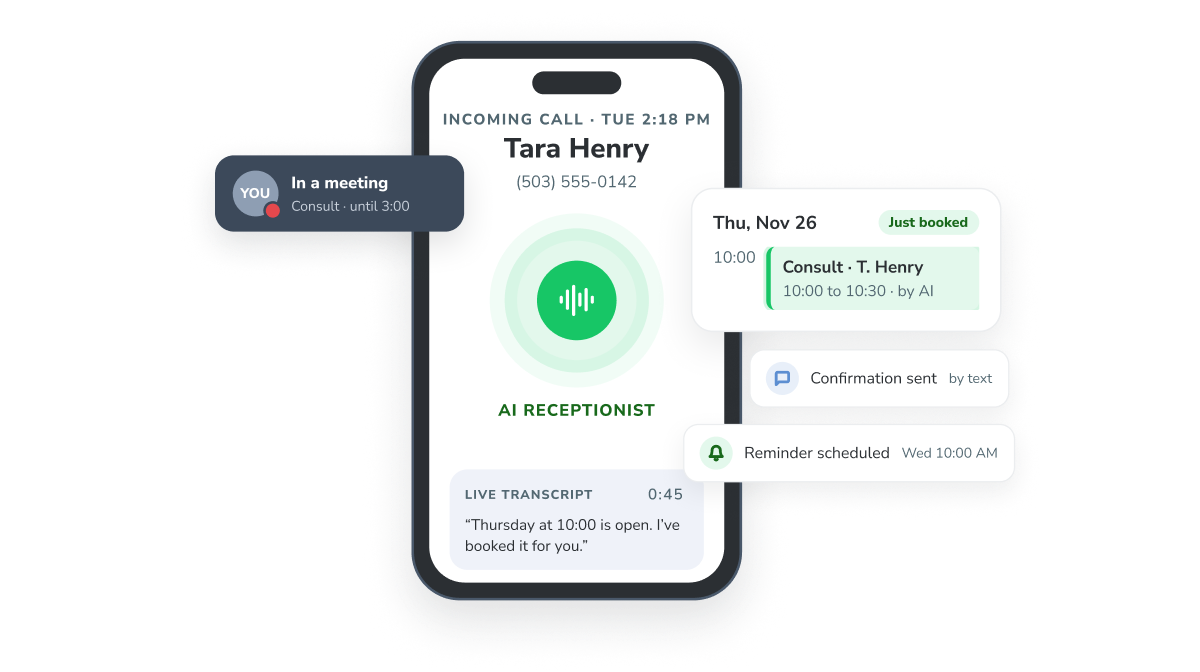
The best AI receptionist doesn’t stop when the caller hangs up. It books the appointment on your calendar and lets your appointment reminders and follow-up messages (the same ones you already send) take it from there. Below, we’ll show you how it works and what questions to ask as you compare options.
Answered, Booked, Kept: Three Stages of One Appointment
It helps to think of every appointment as having three stages. An AI receptionist (or any AI answering service) is usually judged on the first one: how quickly it picks up, how natural it sounds, and how many calls it can take at once.
- Answered: someone picks up, and your caller gets the help they need.
- Booked: a time goes on your calendar.
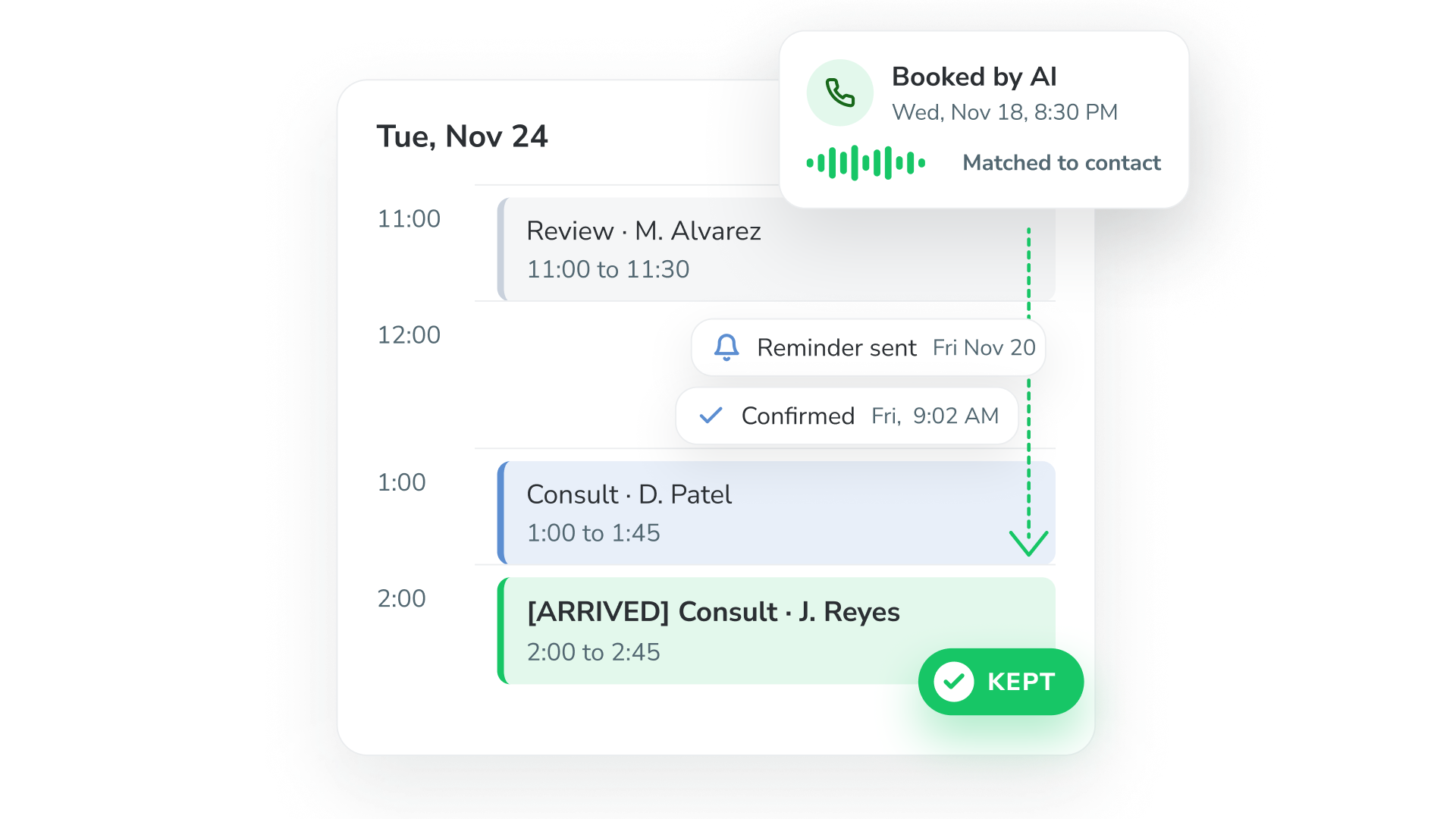
- Kept: your client confirms, shows up on the right day, and the appointment happens.
Your business gets paid at the third stage, so that’s the best place to judge any tool you’re considering.
Why a Booked No-Show Costs as Much as a Missed Call
Here’s a simple way to think about it. Let’s say an initial consult with a new client is worth $150 to your business. If you miss the call, you don’t earn that $150. If the call gets answered and the consult gets booked, but your client doesn’t show, you still don’t earn it. You’ve also held an hour you could have offered to someone else.
Over a month, that adds up. If your AI receptionist books ten consults from calls you couldn’t take, and three of those clients don’t show, you’ve gained seven appointments instead of ten. Great appointment reminders help you get closer to ten.
Thankfully, most no-shows have an ordinary cause. 62% of no-shows happen simply because the client forgot. In most cases, your client still wants the appointment and has just lost track of the day. That’s good news, because a reminder at the right time (and an easy way of confirming appointments) takes care of most of it.
So when you look at an AI receptionist, the most useful question to ask is what happens to the booking after your caller hangs up.
What Happens After the Call
A phone call takes a few minutes, but the booked appointment might be days or weeks away. What happens in between has a lot to do with whether your client shows up.
How It Works When Your Receptionist and Reminders Are One System
We’ve been sending appointment reminders since 2010, so when we built Apptoto’s AI Receptionist, we connected it to those reminders from the start. When it books an appointment, the booking goes on the calendar you already use (i.e., Google, Outlook, Exchange, Salesforce, Clio, Redtail, and many more). From there, it gets the same booking confirmation and reminder messages your account already sends.
That means you don’t have to configure anything new. Your wording, timing, and reminder channels (text, email, or voice call) stay the same, because a phone booking is treated like any other appointment on your calendar. After that:
- Your client confirms: they reply to the confirmation or reminder, the same way they do today.
- They can reschedule by text: if you’ve turned the AI Receptionist on for text messages, a client who needs a different time can reply to the reminder to reschedule. It offers your open times, moves the appointment, and resets your reminders for the new time.
- No-shows get a follow-up: if a client misses the appointment, the no-show follow-up message you’ve set up goes out.
How This Compares With Most AI Receptionists
An AI receptionist books a prospective client for Tuesday. On Monday, the client replies to their reminder: “What should I bring, and where should I park?” They expect an answer from the receptionist who booked them. But who actually gets that reply?
If the AI receptionist hands the booking off to your calendar or a third-party app, that system sends the reminder. When the client hits reply, they’re responding to the system that sent the message. Unless that reply is routed back to the AI receptionist, it can’t answer. It’s important to understand where those replies go and who on your team will see and address them.
If the AI receptionist sends its own reminders and handles replies, it should be able to answer those questions directly if you’ve configured it to do so. But how much control do you have over the reminders themselves? Can you set up different reminders for each appointment type and customize them with your own wording, or can you only adjust a few fields in a template? It’s also worth asking what you can tell or send clients before they have to ask. Can you email prep instructions a week ahead, then text parking directions the day before?
With Apptoto, a phone booking made by your AI Receptionist gets the same reminders you’ve set up for clients who book online or at the front desk. You choose the wording, timing, and mix of texts, emails, and calls. When a client confirms or cancels, you see it automatically reflected on your calendar. If they text back with a question or ask to reschedule, your AI Receptionist can respond, or your team can step in. If Tuesday’s visit moves to Thursday, the reminders automatically follow the new date.
Here’s a side-by-side look:
| After the call | Receptionist and reminders as one system | With most AI receptionists |
|---|---|---|
| Where the booking goes | The calendar you already use | The AI tool’s internal calendar or a calendar the tool connects to |
| Confirmation and reminders | The messaging sequence(s) your account runs, in your wording, using your preferred channels | A separate integration, your staff, or the vendor’s set sequence |
| Reschedule | The client replies by text, and reminders restart for the new time | The client calls back, or your staff sort it out |
| No-show | The follow-up you already set up goes out | Your team notices and follows up |
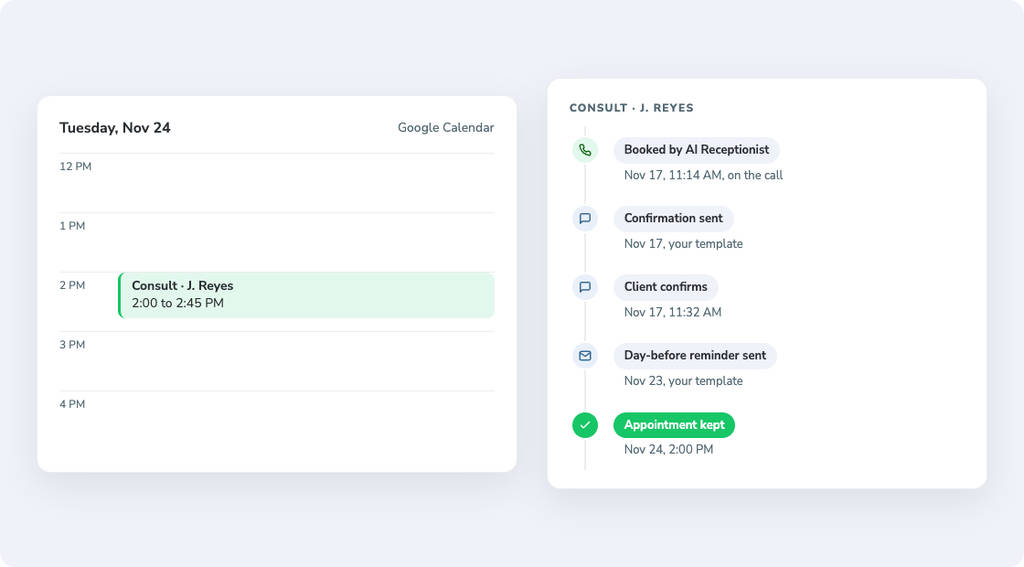
Want to hear a call and see the booking land on your calendar? Hear the AI Receptionist in action →
An Example: One Booking From Phone Call to Kept Appointment
Let’s look at how this plays out at a four-attorney firm that already uses appointment reminders. A new client, Dana, calls on a Tuesday afternoon while everyone is with clients. The AI Receptionist answers and books her a consult for Thursday at 10:00 AM.
Here’s what happens next. (The first two messages use wording the office manager wrote long before the firm turned the receptionist on.)
Tue 2:17 PM, confirmation: Hi Dana, you’re booked for a consult on Thursday at 10:00 AM. Please bring a photo ID and any letters you’ve received. Reply 1 to confirm, 2 to cancel, or manage your appointment here: https://ap-pt.com/s/ab3303
Wed 6:00 PM, reminder: Reminder: your consult is tomorrow at 10:00 AM. Need a different time? Reply to this text, and we’ll find one.
Wed 6:04 PM, Dana: Can we do Friday instead?
Wed 6:04 PM, reply: Friday, we have 9:30 AM and 1:00 PM open. Which works better?
Wed 6:05 PM, Dana: 1:00
Wed 6:05 PM, reply: Done. You’re set for Friday at 1:00 PM. We’ll send a reminder Thursday evening.
No one at the firm had to pick up the phone or send a message by hand. The Thursday opening came up early enough to offer to another client, and Dana kept her Friday appointment.
You also decide how much of this happens automatically for your business. Booking and rescheduling are both settings you can turn on or off with Apptoto’s AI Receptionist. If you’d rather handle reschedules yourself, the AI Receptionist will take a message for you instead.
Four Questions to Ask Any AI Answering Service
If you’re comparing options, these four questions will tell you a lot about any AI receptionist or AI answering service (ours included):
- Who sends the confirmation and appointment reminders after the AI Receptionist books? Look for a specific answer about which system sends them and when.
- Can it use the appointment reminders I already send? If you need to rebuild your messages in a new system, add that to your setup time.
- How does a client reschedule? Ask whether they can do it by text, and whether the reminders move with the appointment.
- What happens when someone doesn’t show? Someone needs to notice and follow up, so find out whether that’s the tool or your team.
It also helps to ask for a demo that follows one booking from the phone call to a kept appointment, so you can see every step for yourself.
Choose an AI Receptionist that makes sure appointments happen
Answering the call matters, and it’s where every appointment starts. But your business gets paid when the appointment happens. The AI receptionist worth choosing helps with every step in between: it answers, books on the calendar you already use, and hands the appointment to reminders your clients already know.
Already using Apptoto? Open the AI Receptionist in your account and click Try It Out to test a call or a text.
New to Apptoto? Connect your calendar and hear it answer your own line.