
No-shows. Two simple words that send a wave of frustration through any owner or employee of an appointment-based business. Whether you’re running a medical practice, a beauty salon, or a consultancy, the impact of a missed appointment is more than just a minor inconvenience.
It’s lost revenue, wasted time, and a hit to your carefully structured schedule.
This isn’t an issue you can afford to ignore. So, what’s the solution? Is it as simple as picking up the phone and calling no-show clients? Or is there a smarter, more efficient way to handle this persistent problem? Let’s explore your options.
The Impact of No-Shows on Your Business
No-shows can significantly impact your daily operations, regardless of what industry you’re in. When a customer or client fails to show up for a scheduled appointment, it leaves a gap in your day that could have been filled by another paying customer. This idle time results in lost revenue twice over and can throw off your entire schedule, especially if you have other appointments lined up.
Beyond the immediate financial implications, no-shows can also affect your client relationships. Repeated missed appointments without communication can erode trust and lead to frustration. For service providers, maintaining strong customer relationships is crucial for long-term success. Ultimately, you’ll have to decide how far you’ll allow your customers to push against your cancellation and no-show policies before asking them to find another provider.
The Debate: Should You Call No-Shows?
Many businesses grapple with whether to call the customer or client to follow up when faced with a potential no-show.
There are a few ways to proceed; ultimately, it’s up to you to decide on the best option for your business. Regardless of whether you call no-show clients, it’s critical to have a cancellation policy that clearly states your policies and fees. You can:
Immediately Reach out to Clients Who Miss Their Appointment
This approach involves a structured process with clearly defined follow-up timelines. For instance, you might start by calling the client when they are at least 10 minutes late. If there’s no response to the initial contact, you can follow up again after a set number of hours to reiterate your no-show policy and discuss the next steps. This method ensures that clients are promptly reminded of their commitments and allows them to reschedule or confirm their intentions.
No-Show Call Scripts
Below are a few scripts to use when calling a client who hasn’t shown up.
When calling within 10 minutes of the missed appointment:
Hi {{Client Name}}, this is {{Your Name}} from {{Business Name}}. We had you scheduled for an appointment today at {{Time}} and wanted to check in since we haven’t seen you yet. If you’re running late, we may still be able to fit you in, but we can only hold your spot for another {{# minutes}}. Please give us a call back at {{Phone Number}} or reply to this message and we’ll get you taken care of.
When following up a few hours later (if no response):
Hi {{Client Name}}, this is {{Your Name}} from {{Business Name}} following up on your missed appointment today at {{Time}}. We understand things come up. Please give us a call at {{Phone Number}} to reschedule, and keep in mind that our cancellation policy does apply to missed appointments. We’d love to get you back on the schedule.
When leaving a voicemail:
Hi {{Client Name}}, this is {{Your Name}} calling from {{Business Name}}. We missed you at your {{Time}} appointment today and wanted to make sure everything is okay. Please call us back at {{Phone Number}} so we can reschedule, and just a reminder that per our cancellation policy, a {{#}} fee may apply to missed appointments. We look forward to hearing from you.
No-Show Text Script
If you’d rather send a text to your client as soon as they’re late:
Hi {{Client Name}}, we noticed you’re running late for your appointment at {{time}} today. Please call or text {{phone number}} with your estimated arrival time. If you need to reschedule, please let us know immeadiately. Thanks!
Offer a One-Time Grace Period with a Friendly Reminder
This option strikes a balance between maintaining a customer-friendly approach and enforcing your policies. When a client misses an appointment, you can send a polite message or email acknowledging the missed appointment and offering a one-time opportunity to reschedule without penalty. This communication should also remind them of your cancellation policy and the importance of adhering to it going forward. This method helps preserve the client relationship while subtly reinforcing the boundaries of your policy.
Grace-Period Call Script
Hi {{Client Name}}, this is {{Your Name}} from {{Business Name}}. We noticed you weren’t able to make it to your appointment today at {{Time}}. We hope everything is alright. Since this is the first time, we’d love to rebook you at no extra charge. Please call us at {{Phone Number}} or book online at {{URL}}. Going forward, we ask you give us at least {{Timeframe}} notice if you need to cancel or reschedule so we can offer that slot to another client.
Skip the Follow-Up and Enforce Your Cancellation Policy
In this approach, you maintain a firm stance by not reaching out to clients after a no-show. Instead, you let your pre-established policies speak for themselves. The client will be notified of fees or penalties through automated systems or at the next point of contact. This method emphasizes the importance of keeping appointments and signals that your time—and other clients’ time—is valuable.
If you go this route, the communication still happens, just not in the form of a personal phone call. Your automated system or next point of contact should reference the missed appointment clearly:
Hi {{Client Name}}, our records show that you missed your scheduled appointment on {{Date}} at {{Time}} with {{Business Name}}. Per our cancellation policy, a {{#}} no-show fee has been applied to your account. If you’d like to reschedule, please contact us at {{Phone Number}} or book online at {{URL}}. We ask that all cancellations be made at least {{Timeframe}} in advance to avoid future fees.
No Cancellation Policy? Start Here
Holding no-shows accountable starts with setting clear expectations. Get step-by-step guidance on writing your cancellation and no-show policies with copy-paste templates.
Pros and Cons of Reaching Out to No-Show Clients
If you decide to reach out to your clients directly and immediately, it’s essential to weigh the pros and cons carefully to determine the most effective approach for your business.
Pros:
- Demonstrates Concern: Reaching out to a no-show shows that you care about your customers’ or clients’ needs and well-being. It also reinforces that their appointment was important and valued.
- Opportunity to Reschedule: A phone call offers a direct way to reschedule the missed appointment, potentially saving the business from lost revenue.
- Understanding the Issue: Calling allows you to know why the client missed the appointment, which could reveal underlying issues, such as scheduling conflicts or dissatisfaction with your service.
Cons:
- Perceived as Intrusive and Awkward: Some customers or clients may find a follow-up call intrusive and uncomfortable, especially if they missed the appointment for personal reasons or simply forgot.
- Adds to Your Workload: Following up with no-shows requires additional time and effort from you or your staff. This can be incredibly taxing if you already have a busy schedule, as it means diverting resources from other essential tasks.
- Reinforces Negative Behavior: If no-shows are repeatedly allowed to reschedule without consequence, it may reinforce a pattern of missed appointments, as clients might assume they can cancel without penalty.
Understanding how others handle contacting no-shows can help you decide how to handle this for your business. A recent Reddit discussion in the r/Therapists channel asked therapists about their policies on contacting no-shows, but the insights are relevant to any appointment-based business. These comments reveal the frustrations and the creative solutions appointment-based business owners use to tackle this issue. Let’s dive into some of these insights to see how different strategies might work for your business.
(Bonus: if you use Outlook like the last therapist in the Reddit thread above, here’s our latest guide on setting up Outlook text appointment reminder).
Best Practices for Handling No-Shows
Handling no-shows effectively requires a strategic approach that balances business needs with customer care. Here are some best practices to consider:
Establish a Clear Policy: Having a well-defined cancellation/no-show policy is crucial. This policy should be communicated clearly during the booking process so customers know the consequences of missing an appointment without notice. Include information about any fees or penalties associated with no-shows.
Consider the Situation: Not all no-shows should be treated the same. Assess the situation before deciding whether to make a follow-up call. Consider the customer’s history, the nature of your business, and any known circumstances that may have led to the missed appointment. Tailor your communication to be sensitive and professional.
Documenting No-Shows: Keep detailed records of no-shows and any follow-up communication. Documentation is invaluable in case of any disputes. Reviewing these records regularly to identify patterns and take proactive steps to reduce future no-shows is also a good practice.
How Technology Can Help: Automating Appointment Reminders and Follow-Ups
Relying solely on manual methods to manage no-shows is inefficient and can lead to increased frustration for your staff and clients. Fortunately, technology offers smarter, more efficient solutions to keep your schedule intact and your business running smoothly.
Automated appointment reminders and follow-up messages can help customers remember their appointments and make it easy to reschedule if necessary. This reduces the likelihood of no-shows and minimizes the need for manual follow-ups.
Appointment management software like Apptoto can handle both sides of this problem: preventing no-shows before they happen and automating follow-up when they do.
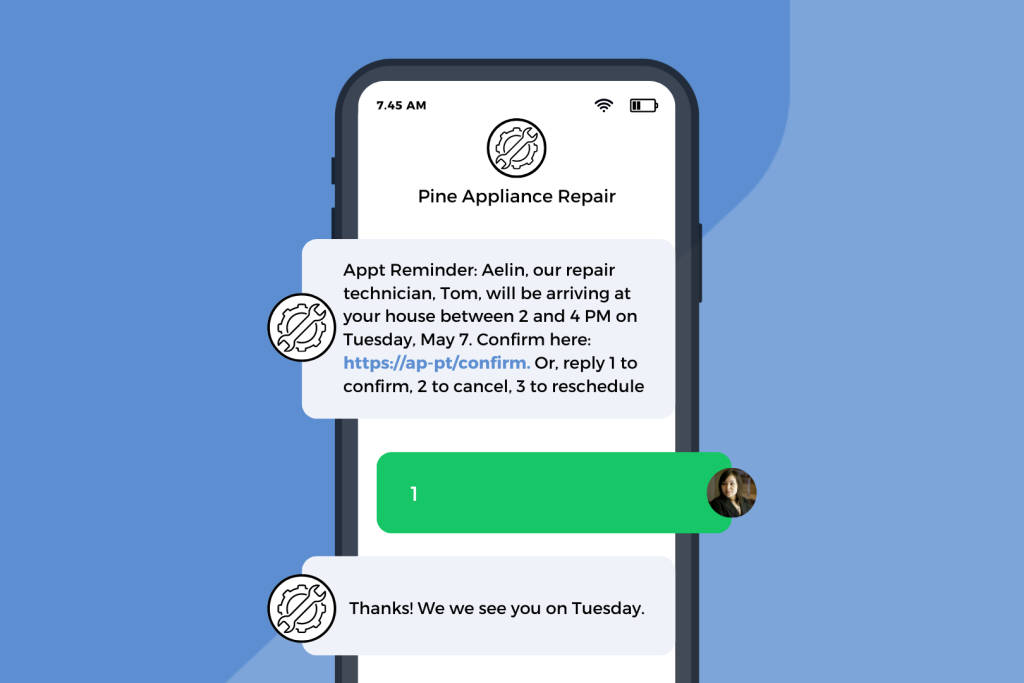
Apptoto’s automated appointment reminders are designed to reduce the likelihood of no-shows before they occur, ensuring that your clients are always aware of their upcoming appointments. By sending timely, automated reminders via text, email, or voice call, Apptoto helps to keep your calendar full and your revenue steady.
How to Automatically Contact No-Show Clients As Soon as They’re Late
Don’t sit idly by, waiting for the front door to swing open and your client to arrive, only for them to never appear.
With Apptoto, you can set up a notification to send to your client as soon as you mark them as “Late” or “No-Show.” We recommend sending an automated call or text (as they’re harder to ignore), that alerts the client they are X minutes late to their appointment, and gives them next steps (depending on your no-show policies). Notifications aren’t enabled by default in Apptoto, so if you’re interested, reach out to our Customer Success team at support@apptoto.com.
Once notifications are enabled, to set these up:
- Log in to Apptoto.
- Navigate to the “Messaging” tab > “Appointment Auto Messages.”
- Click “+Add rule.”
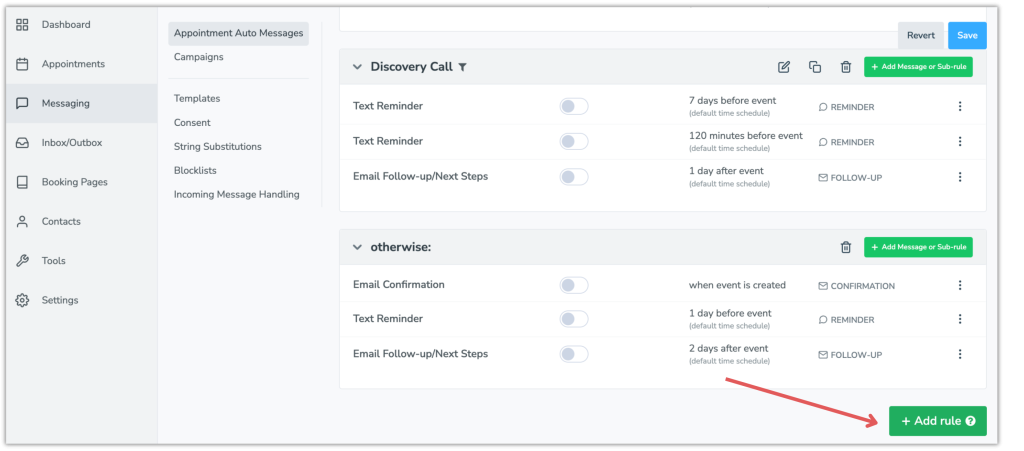
- Name your Rule.
- On the Advanced tab, select:
- First Field: participant.check_in_state
- Second Field: ==
- Third Field: noshow
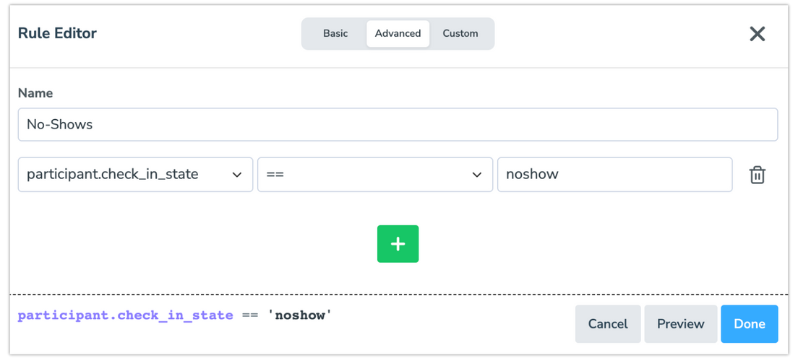
- Click “Done.”
- Under the new rule you created, click “+Add Message or Sub-rule.”
- Select whether you’d like to send a Call, Text, or Email to no-shows.
- Set Purpose to “Notifications.”
- Set Name, When (timing), and Language as desired.
- Click the “Edit” button next to the Message field.
- Enter your no-show message in the Message field.
- The “No-Show Text Script” template above is available for you to use, or customize your own.
- If using a voice call, you can also upload your own MP3/WAV file and/or set the default TTS voice.
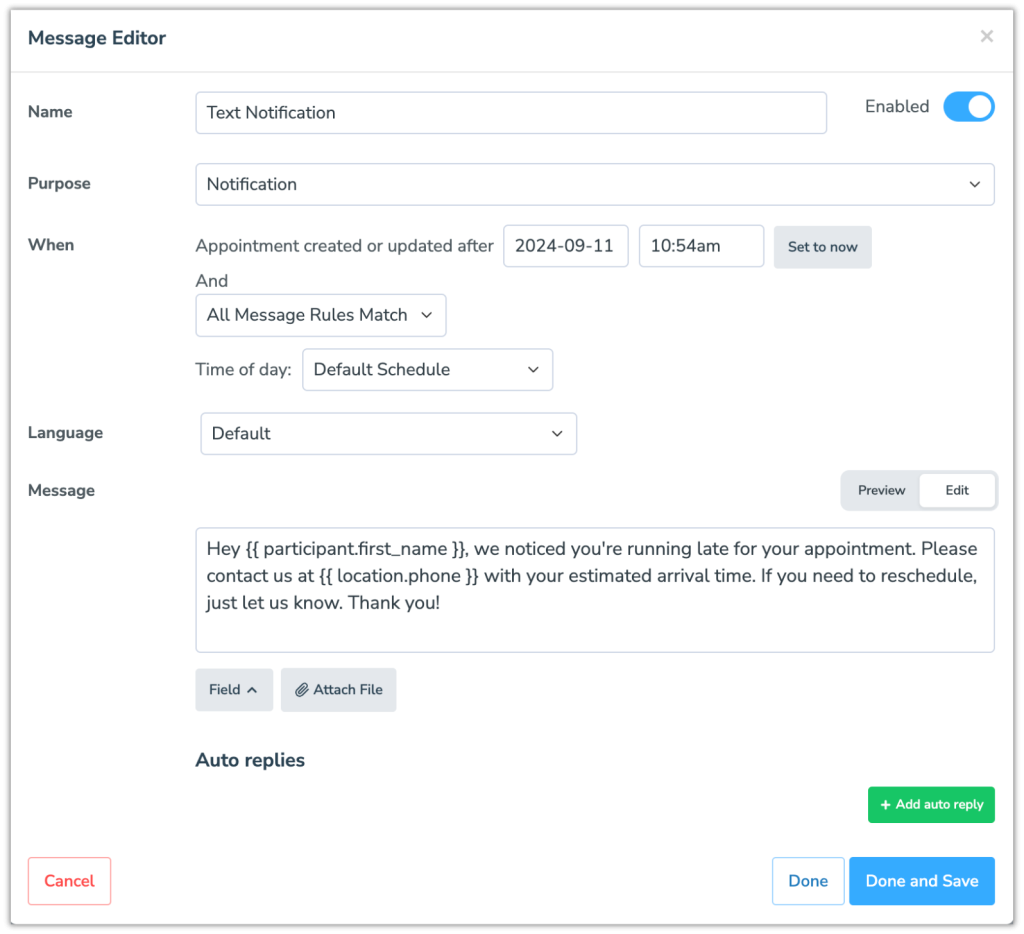
- Click “Done and Save.”
- Repeat steps 3-13 for “Late Arrivals” if desired.
- In step 5, set the third field to late (instead of noshow)
- Click “Save” in the upper right-hand corner of the “Appointment Auto Messages” screen to save all changes.
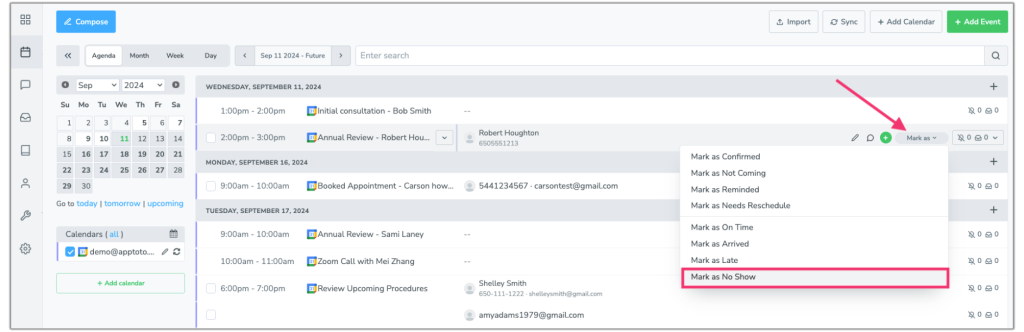
To have these custom “No-Show” or “Late” messages sent to your clients, you’ll need to mark them as “No-Show” or “Late” in Apptoto.
- On your Appointments tab, hover over an appointment.
- A Check-In Status drop-down will appear. Select “Mark as Late” or “Mark as No Show.”
- That’s it! Apptoto will automatically send a custom message.
Follow Up With No-Shows After They Happen
Once you know clients are running behind, Apptoto’s business texting tool lets you message them directly (if you didn’t choose the call route). Clients can text you to let you know they will arrive just a few minutes late (whew 😮💨), if they need to reschedule, etc., and you can easily respond back with next steps and rescheduling links if needed.
Stop Chasing No-Shows. Start Preventing Them
No-shows may feel like an inevitable part of doing business, but they don’t have to be a constant headache. With a clear policy, the right follow-up approach, and automated reminders handling the repetitive work, you can spend less time chasing down missed appointments and more time serving the clients who actually show up.
Apptoto handles the prevention side: automated reminders via text, email, and voice; two-way messaging so clients can reschedule instead of ghosting; and real-time notifications when someone doesn’t show up. Try it free for 14 days or request a demo to see how it works for your business.