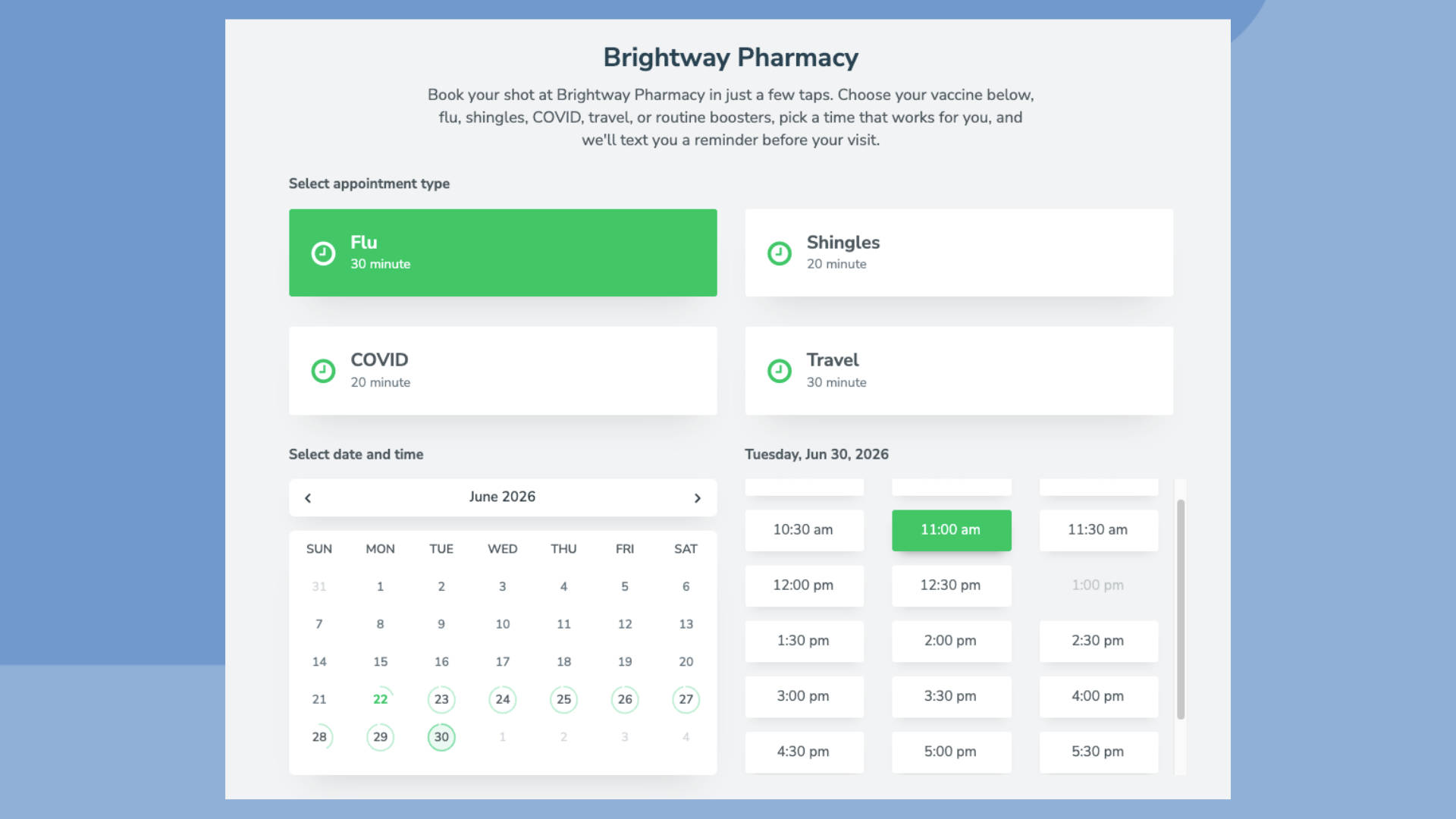
A vaccination program only works when patients actually show up. You can stock the fridge, staff the clinic, and open the slots, but if a third of patients forget or skip their appointments, your schedule has holes, and your patients fall behind on the shots that keep them healthy.
No-shows are not a small problem. The national average no-show rate for medical appointments is 23%, and 62% of missed appointments are due to one simple reason: the patient forgot. Vaccination visits are especially easy to put off because they rarely feel urgent. A flu shot, a routine booster, or the next dose in a childhood series is simple to push to “next week,” and next week often never comes.
The good news: vaccination scheduling is one of the most fixable workflows in a practice. With online booking, automated reminders across text, email, and voice, and recall campaigns for patients who are due or overdue, you can keep more appointments and protect more patients. Here is how to do it, step by step.
Why vaccination appointments slip through the cracks
Patients miss their vaccination appointments for a few predictable reasons:
- Low perceived urgency. Patients treat preventive care as optional, so it loses to work, childcare, and everything else competing for the day.
- Multi-dose series. Many immunizations require two or more visits weeks or months apart. Each gap is another chance to drop off before the series is complete.
- Seasonal timing. Flu shots and other seasonal vaccines create a rush during a short window, which strains front-desk staff and leads to double bookings and missed follow-ups.
- Plain forgetfulness. An appointment booked in September for October is easy to forget by the time it arrives.
Each of these has a practical answer. The seven best practices below work together as a system.
1. Let patients book vaccination visits online, around the clock
Roughly 70% of patients prefer to book appointments online rather than call during business hours. A booking page for your vaccination services lets them choose a time that fits their schedule, day or night, without phone tag with your front desk. With Apptoto online scheduling, those bookings drop straight onto the calendar your team already uses, so there is no separate system to check and no double-entry.
- Create separate booking types for flu shots, travel vaccines, childhood immunizations, and routine adult boosters so patients land in the right-length slot.
- Collect insurance details or a screening questionnaire directly after booking to shorten the in-office visit.
2. Send automated reminders by text, email, and voice
Automated appointment reminders are the single highest-impact change most practices can make. Text reminders matter most: 90% of text messages are read within three seconds, and texts get a 53.5% higher response rate than voice calls. Email and voice still have a place for patients who prefer them, so the strongest approach is multi-channel.
A reliable patient reminder system reaches every patient on whatever channel works for them and asks them to confirm, all without your staff lifting a finger. Practices using Apptoto reminders cut no-shows by 40% to 70% on average, and by up to 90% in the best cases.
3. Time your reminders so patients actually act on them
When you send matters as much as what you send. Based on confirmation data across millions of messages, a few timing rules hold up well:
- Text reminders: 6 PM drives a 41.4% higher confirmation rate than a midday send.
- Email reminders: 5 AM, 9 AM, or 10 AM tend to perform best.
- Voice reminders: around 3 PM works well for patients who do not respond to text or email.
A common cadence for vaccination visits is a confirmation at booking, a reminder a few days out, and a final reminder the day before. For a multi-dose series, schedule the reminder for the next dose as soon as the first is given.
4. Make rescheduling a one-tap action
When a patient cannot make it, the goal is to move the visit, not lose it. If rescheduling means calling during business hours, many patients simply will not, and the appointment becomes a no-show. Give every patient a link that lets them pick a new time on your calendar in seconds, whether the visit was booked online, by phone, or added by staff. A booked-but-moved appointment keeps the patient in your care and the slot open for someone else.
5. Run recall campaigns for patients who are due or overdue
Reminders keep existing appointments. Recall campaigns bring back patients with no appointments booked. This is where vaccination programs gain the most ground, because so much of immunization is about reaching people at the right moment.
- Flu shot reminder outreach to your whole patient list each fall.
- Second-dose and booster reminders for anyone partway through a series.
- Childhood immunization recalls timed to a child’s age and schedule.
- Travel vaccine outreach when a trip is on file.
With Apptoto Campaigns, you can message patients on an existing calendar or in an address book without exporting and re-importing lists. Segment by who has not been in for a while, send a personalized text or email, and include a booking link so they can schedule on the spot. It turns your patient list into a tool for filling the schedule.
6. Confirm appointments, fill cancellations, and message both ways
Two-way messaging closes the loop. When a patient can reply to a reminder to confirm, cancel, or ask a question, your front desk spends less time on the phone and more time on patients in the room. When someone cancels, a quick message to a waitlist can fill that slot the same day so the vaccine and the time do not go to waste.
7. Keep every message HIPAA-compliant
Patient communication has to meet a higher bar. Apptoto offers HIPAA-compliant messaging, opt-in flows, audit logs, and user access controls, and the platform is SOC 2-compliant. You get the convenience of automated reminders and campaigns while meeting the standards that regulated healthcare practices are held to.
A real example: Carvajal Pharmacy
Carvajal Pharmacy, a family-owned business that has served its San Antonio, Texas, community for more than 50 years, needed a way to handle a surge in vaccine appointments without clogging its phone lines or filling its schedule with no-shows and unqualified patients. They wanted software that:
- Could send text messages
- Sent custom, prescheduled messages correctly according to multi-dosage timing requirements
- Had customizable booking pages that could be configured based on pharmacy and vaccine availability
- Qualified patients, so appointments weren’t being filled unnecessarily
- Was simple to use
- Launchable as soon as possible!
Using Apptoto Booking Pages, Campaigns, and Auto Messages, the pharmacy quickly hit its target of vaccinating 100 patients per day. The system worked so well that the state scaled its allotment to more than 500 patients per day, all while keeping staff time free to actually administer vaccines and deliver the patient care they are known for.
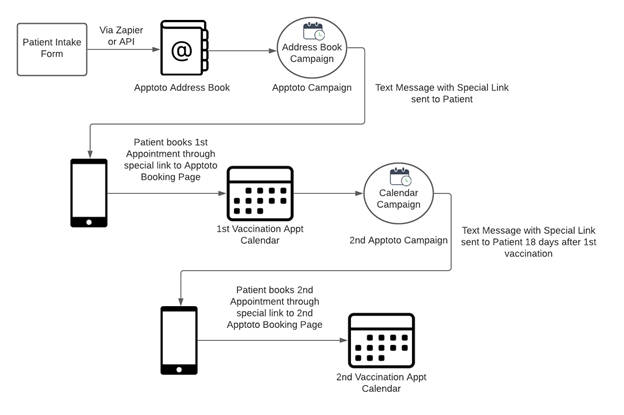
Want to see exactly how Carvajal did it? Check out these step-by-step instructions for using Apptoto Booking Pages and Campaigns to create a patient vaccination appointment scheduling system and how to recreate it.